
diados
Extension of the Day

diados

5.0 FREE
  • Screenshot 1

Description

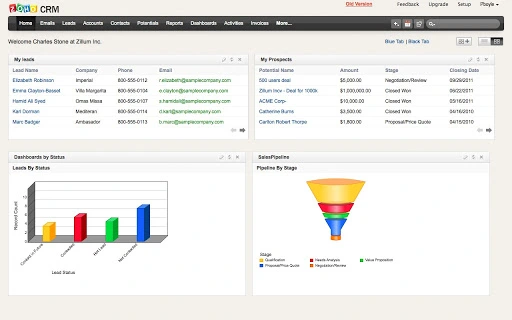
Zoho CRM empowers organizations with a complete customer relationship life-cycle management software for managing organization-wide Sales, Marketing, Customer Support & Service and Inventory Management in a single business system. Zoho CRM is simple to use, yet packed with features and advanced functionality that allow you to grow your business while having a single view of your customer interactions. Benefits: * Automate your Sales and Marketing with ease * Have a complete grip on your communication with your contacts * Take advantage of an Award-Winning, complete CRM solution * No Servers, No expensive software and No Backup solutions. It's all hosted ! * Not just CRM - gain access to the entire Zoho suite of products * No long term contracts, pay as you go Features: * Align your sales and marketing by integrating sales with campaigns, leads, sales pipeline, forecasts, etc * Track all your Customer Email correspondence inside Zoho CRM * Easily import and get access to your Google Apps or Gmail contacts from within Zoho CRM * Synchronize Contacts and create mail merge documents * Drag-and-Drop tools to customize Zoho CRM according to your business requirements * Control data access based on your organizational hierarchy with Zoho CRM's Role-Based Security * Complete your post sales activities with an integrated inventory management system * Analyze Sales & Marketing trends and key CRM metrics with Reports & Dashboards * Integrate CRM modules with third party applications such as Accounting, ERP, etc using Developer API Add-ons & Integrations: * Google Apps Marketplace * Zoho Mail Add-on * Zoho CRM for Microsoft Outlook * Zoho CRM for Microsoft Office * QuickBooks Integration * Zoho PhoneBridge (Telephony integration with Asterisk, Avaya, and Trixbox) * Zoho Projects Integration Price: Free for 3 users. Paid Edition starts at USD 12/user/month

Guides & Tutorials for Zoho CRM App for Chrome

How to install Zoho CRM App for Chrome
  1. Click the Preview / Download button above.
  2. Once redirected, accept the terms and click Install.
  3. Wait for the Zoho CRM App for Chrome download to finish on your device.
How to use Zoho CRM App for Chrome

This software is primarily used for its core features described above. Open the app after installation to explore its capabilities.

User Reviews for Zoho CRM App for Chrome 0

    No reviews found

Similar Apps


